
Play on everyone's own phone
Everyone sees their own card on their own iPhone. No passing the phone around, no internet needed.
How it works
- Everyone opens Imposter with Bluetooth and Wi‑Fi turned on.
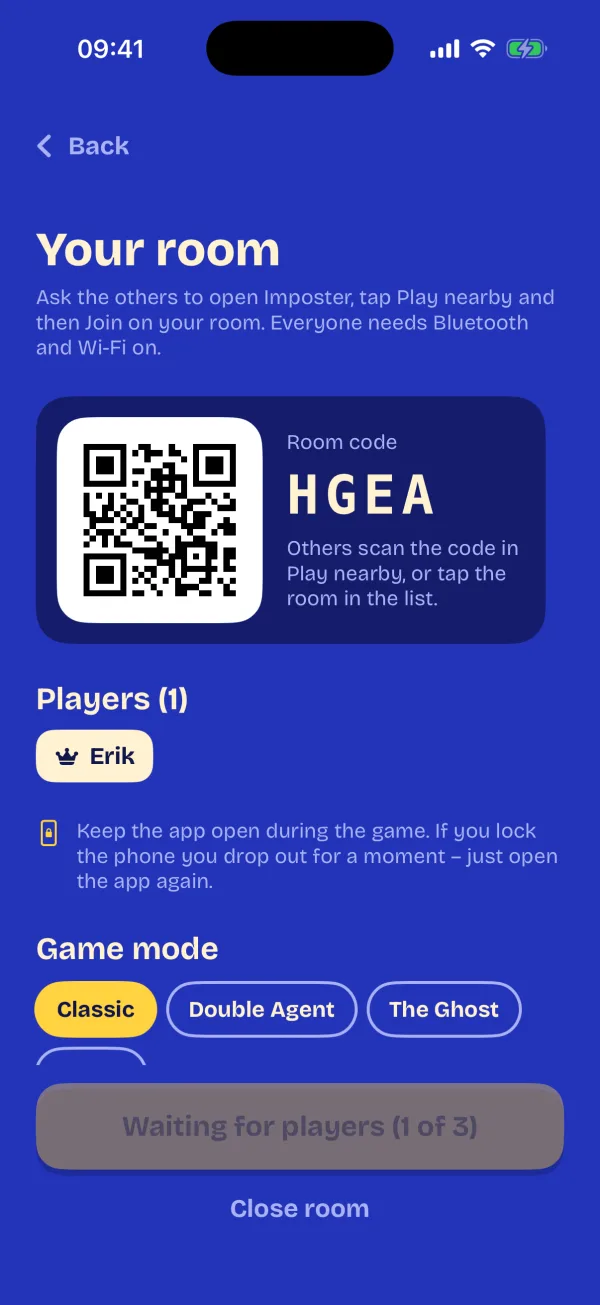
- The host taps Play nearby → Start a room.
- The others tap Play nearby and pick the room from the list – or scan the room's QR code.
- The host starts the round. Everyone sees their own card, and the timer, speaking order, voting and reveal follow along on every phone.
What stays in sync
- Each player's own card – nobody sees anyone else's
- The speaking order, with your own place in it
- The discussion timer
- Secret voting on each phone
- The reveal and the scores
- Players who drop out can rejoin the round
Good to know
- Only iPhone for now. A room takes up to 8 phones.
- Guests always play free. Only the person who starts the room needs “Play together” unlocked.
- Without an unlock you can start rooms for one trial day, with up to 4 phones.
- Everyone needs the same version of Imposter.
If the phones can't find each other
- Turn on Wi‑Fi and Bluetooth and turn off airplane mode.
- Allow Local Network for Imposter: Settings → Privacy & Security → Local Network.
- Turn off any VPN – it often hides the phones from each other.
- The host keeps Imposter open while the others join.
Coming soon
Online play over distance – coming soon
Play with friends who aren't in the same room, with a room code. Online play is on its way; like playing together, only the host will need to unlock it.